Release Notes
Version 4.20.0, 11.10.2026
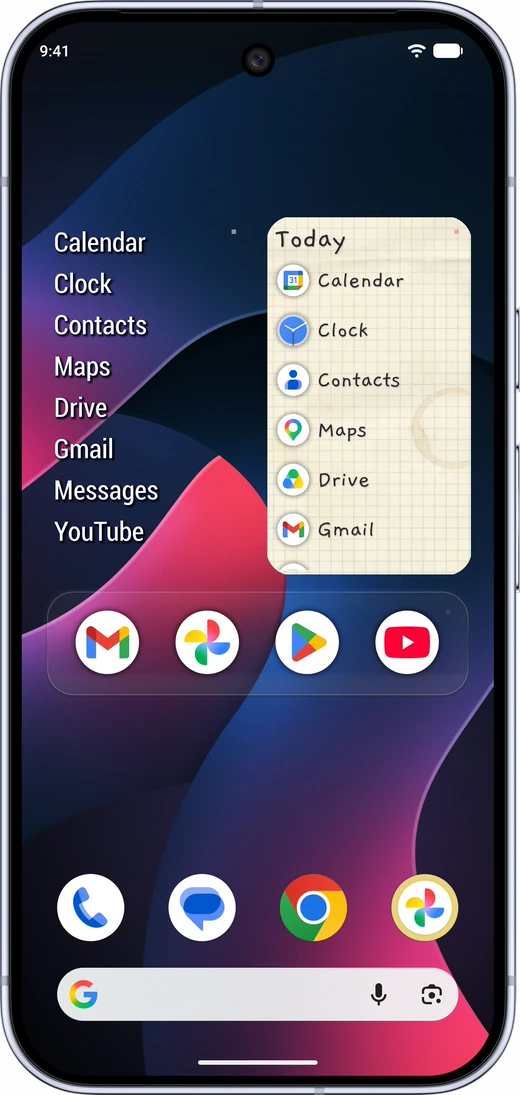 Paper Notes preset
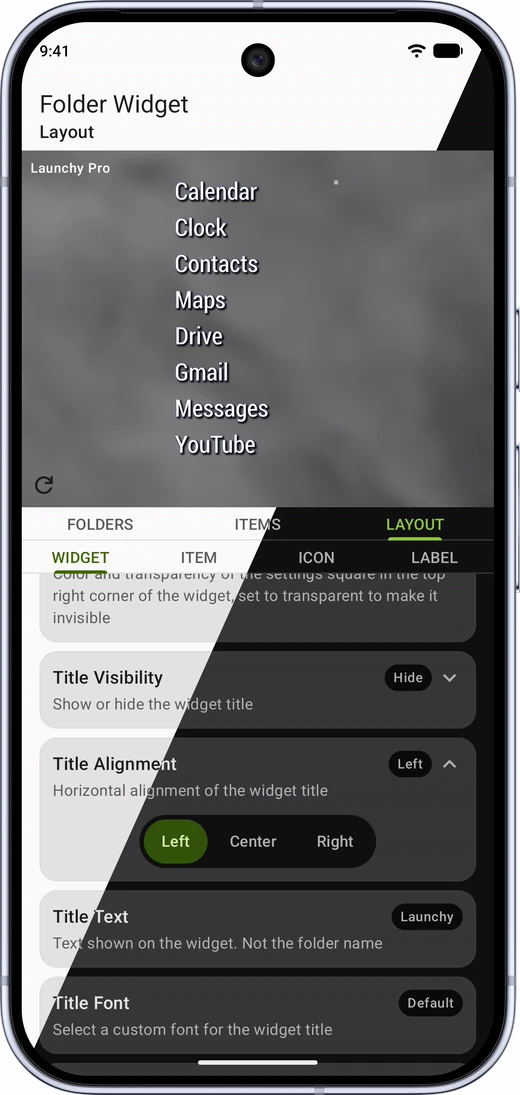 Light and dark theme
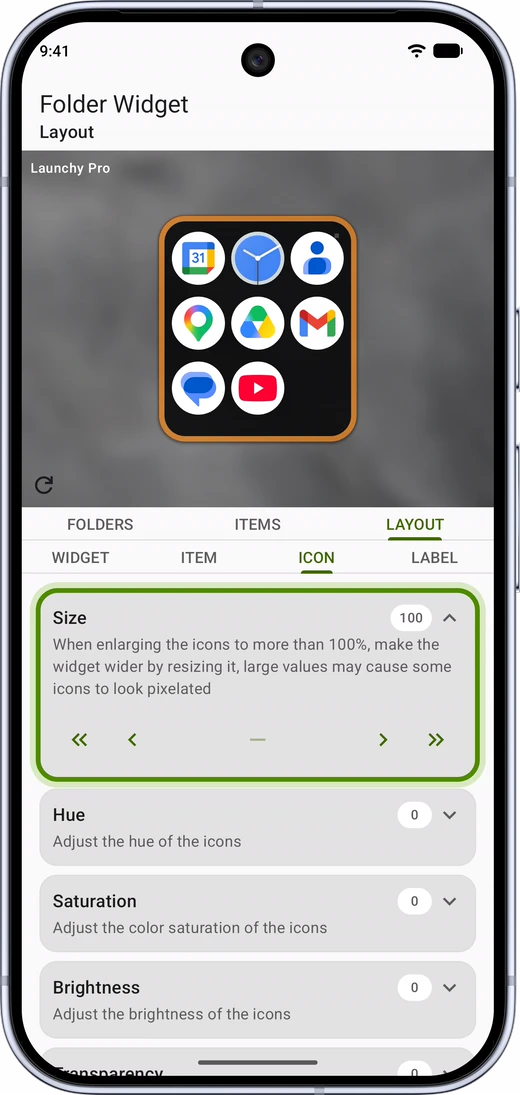 New layout controls
Light and Dark Theme
The Launchy app has a new look, with the same colors on every screen, built around the green of the Launchy logo. The app follows the dark mode setting of your device, and every screen and dialog now looks right in both light and dark mode, including the icon picker.
Accurate Widget Preview
The widget preview in the settings screen and on the Dashboard now shows your widget exactly as it looks on the home screen. The preview takes the shape and size of the widget on your home screen and shows all items in the folder, not only the first 10. The resize arrows are removed, because the preview now sizes itself.
Also in this Release
- New: Paper Notes preset is available in the Preset Library
- New: Redesigned Layout tab, with a switch for options and a stepper for settings with many values
- New: Redesigned icon picker
- Improvement: Color values are shown as #RRGGBBAA, with transparency last
- Improvement: Alignment options are shown in the order Left, Center, Right
- Improvement: Dialogs are updated to match the rest of the app
- Improvement: The widget settings screen is drawn edge to edge, lists scroll behind the navigation bar
- Fix: Sharing a link to Launchy no longer crashes the app
- Fix: Presets using the newer label fonts, such as Orbitron, Doto and Codystar, keep their font when imported
- Fix: Back button closes the navigation drawer on the Dashboard instead of closing the app
- Fix: Status bar icons are readable in dark mode
- Update libraries and dependencies

Your feedback is welcome!
Launchy Widget feedback Google Form
Follow Launchy Widget for the latest updates!
Version 4.19.0, 30.07.2026

Dashboard Screen Improvements
Changing the look of a widget no longer means opening its settings. Now you can apply presets from the preset library directly from the Dashboard screen. Click the presets button, select a preset, and your widget is immediately transformed.
Each Dashboard card now also shows the folder name next to the widget title, so it is easy to tell apart widgets that share a similar look.
Also in this Release
- New: Glass Column preset is available in the Preset Library
- New: Added three new fonts - Orbitron, Doto and Codystar
- New: Font selection is now a bottom sheet, which keeps the preview visible so you can immediately see the selected font
- New: Release Notes, About, and a link to Launcher Two, another app from RSP Dev, in the navigation drawer
- Refactored the Items and the Folders tabs, mainly under the hood changes
- Improvement: The widget title is imported and exported with a preset and the folder name is imported and exported with items
- Change: Presets are imported from JSON files only. Support for the old LWP preset files has been removed
- Fix: Widgets removed from the home screen no longer linger on the Dashboard
- Fix: Widgets are restored correctly after a device backup and restore, keeping their items and layout
- Fix: Selecting the wrong file when importing a preset now shows a clear error instead of failing silently
- Update libraries and dependencies
Version 4.18.0, 15.05.2026
Dashboard Screen in Launchy App
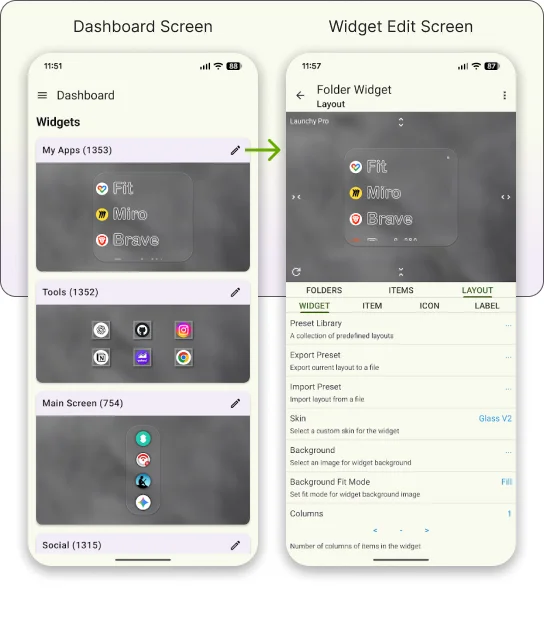
Dashboard page in the Launchy app is a central place where you can see all your active Launchy widgets in one place. It provides a live preview of each widget, allowing you to see exactly how they look on your home screen. From the dashboard, you can easily access the settings of each widget with a single tap, making it more convenient to customize and manage your widgets, this is an alternative to opening the widget settings screen via the settings square.
- Dashboard: Opens automatically when you launch the Launchy app. Shows a live, scrollable list of all your active Launchy widgets.
- Live widget previews: Each widget preview renders your widget exactly as it appears on the home screen.
Version 4.17.0, 27.04.2026
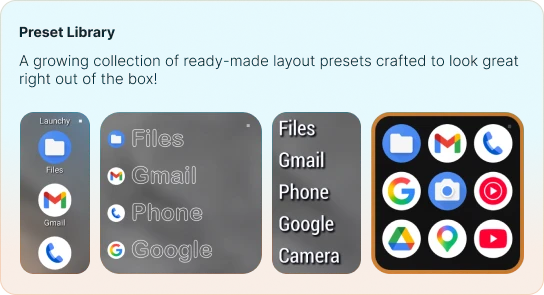
Preset Library
Instantly transform your Launchy widget with the new Preset Library - a growing collection of ready-made layouts crafted to look great right out of the box.
Instead of tweaking colors, spacing, and backgrounds from scratch, just open the library, tap a preset, and your widget updates in seconds. Not happy with the result? One tap on Revert brings your previous layout right back. New presets are added regularly, so there's always something fresh to try.
Do you have a cool preset that you want to share with others? Export it and send it to [email protected]
- Preset Library with 4 starter presets
- Fix: Folders with many items now load without errors
- Fix: Resolved an issue where icons wouldn't display correctly after being cached
- Update dependencies
Version 4.15.0, 08.11.2025
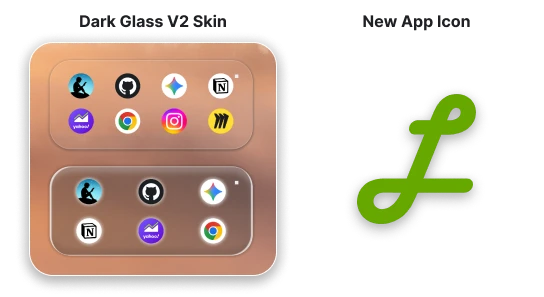
New Icon and Updated Skin
This release introduces a new app icon for Launchy Widget, along with an updated version of the Dark Glass skin which supports rounded corners.
- Updated app icon according to new design guidelines
- Updated Dark Glass Skin: Dark Glass V2
- Refactored edit icon dialog
Version 4.14.0, 27.10.2025
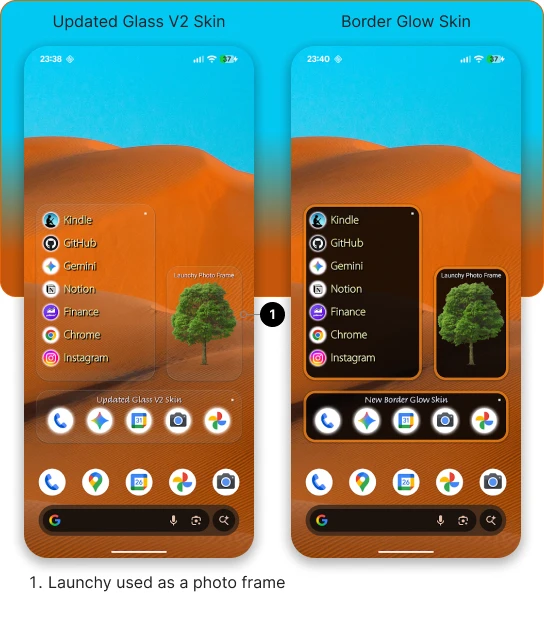
Stability Improvements and New Skins
This release improves the way widgets are loaded on device boot, which results in more reliable display of widgets after device restart.
Add new skin: Border Glow
Updated Glass Skin: Glass V2. It now supports rounded corners
Also in this Release
- Fixed a bug where app would crash on refresh for some users
- Update libraries and dependencies
Version 4.12.0, 27.09.2025
Fix for Empty Widgets
This release addresses issues with empty widgets and disappearing items, which were introduced in previous releases of the app. This has caused a lot of frustration for the users and hopefully this update will resolve these problems.
Also in this Release
- Increased number of columns for the widget to 8
Version 4.11.0, 22.09.2025
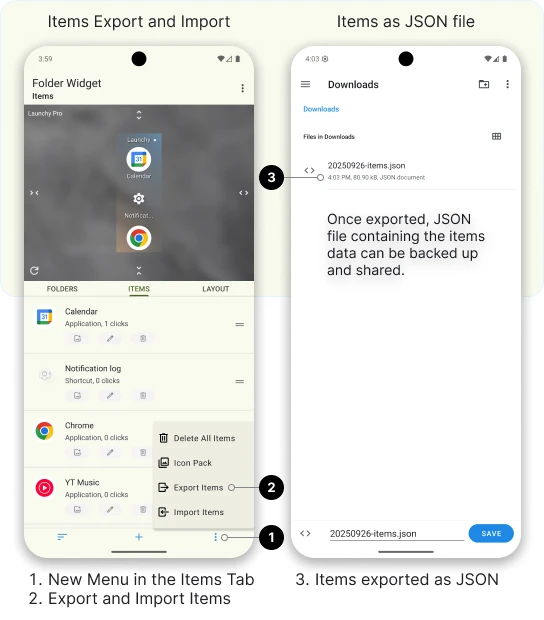
Items Export and Import
It is now possible to export and import items from and to Launchy Widgets. This allows you to back up your items, transfer them between devices or share them with others. This feature is available for free and Pro users.
To export or import items, navigate to Settings > Items > Export/Import.
When exporting items, a JSON file containing items data of the specific widget will be created on your device in a folder of your choosing. Avoid making manual changes to the file as this may cause issues when importing it back into Launchy Widgets.
To import items, open the settings screen for the widget you want to import items to, select the JSON file and confirm the import. Imported items will be added to the already existing items in current Launchy.
Also in this Release
- Bugfixes and improvements
Version 4.10.0, 26.07.2025
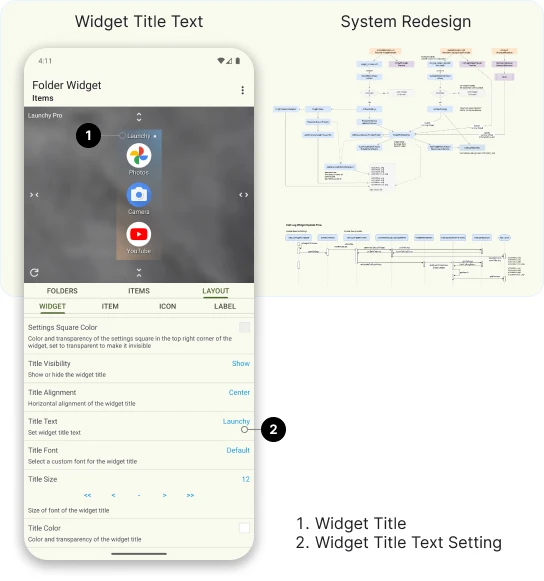
Widget Title Behavior
Starting from version 4.10.0 of Launchy Widget, there is a new setting in the Layout screen which allows you to customize the widget title. When importing and exporting presets, widget title is exported and imported as part of the preset.
To set widget title, navigate to Settings > Layout > Widget > Title Text.
For Launchy Folder Widget, the folder name is still used internally in the settings screen to identify the folder which holds the items of the current widget.
Redesigned Item Generation Mechanism
The internal item generation mechanism has been refactored to improve performance, stability and easier maintenance. This should result in more stable widget behavior. Your feedback about application operation is appreciated, for any feedback or support you can send an email to [email protected] or fill in the Launchy Widget Feedback Google Form.
Also in this Release
- Update libraries and dependencies to support Android 16
- Display missing permissions dialog with permissions required for the application to function properly
- Adjust setting screens to align with Android's edge to edge behavior
- Fixed an issue where folder name was not imported as part of a preset
Version 4.9.0, 20.01.2025
Better Preset Management
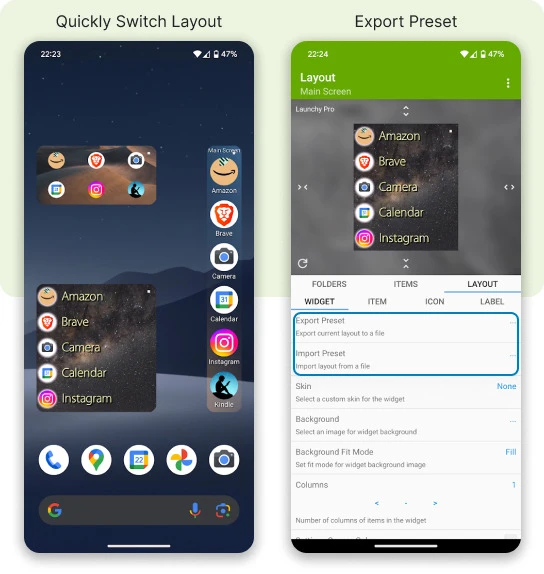
It takes time to create the perfect layout configuration by adjusting the sizes, colors, fonts and placements of the various elements. Preset functionality allows you to save layout customization to an external JSON file which can be backed up and shared. A Preset is a combination of multiple layout configuration settings made by a user.
With Presets you can:
- Copy layout configurations between widgets
- Copy layout configurations between devices
- Backup layout configurations
- Quickly switch the looks of a widget
To get started, tap "Export Preset" in the Layout › Widget Tab.
Starting from this version, presets are exported as JSON files.
It is still possible to import LWP (Launchy Widget Preset) files, however this functionality will be deprecated in the future versions.
To preserve any created presets, it is recommended to import the original LWP files and export them as JSON.
Also in this Release
- Widget background is exported and imported as part of a preset
- Preview width and height is exported as part of a preset
- Folder name is exported as part of a preset
- New default "Blurred Corners" background for newly added widgets
- Up to 10 items are shown in the settings widget preview screen
- Update dependency libraries and java versions
Version 4.8.1, 08.01.2024
Edit URL and Phone Number
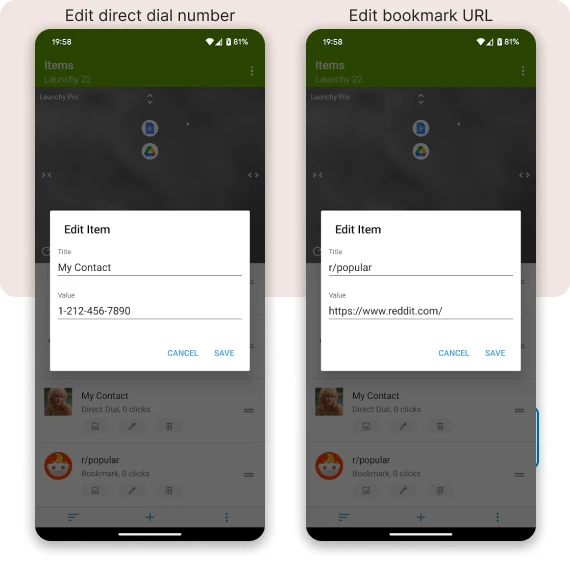
This release adds ability to edit URLs for bookmark items and the phone number of direct dials.
To edit the phone number of a direct dial or URL of a bookmark, click the edit icon of the item, and use the value field to provide new URL or phone number.
- Add option to edit URL of bookmark items
- Add option to edit phone number for direct dials items
- Add Get Pro button to preview area for easier access
- Fix label for Label Shadow Y offset (Thanks to Alex Lin)
- Fix item type and click count labels cropping in items screen
- Update libraries to latest versions
Version 4.8.0, 07.12.2024
Widget Background
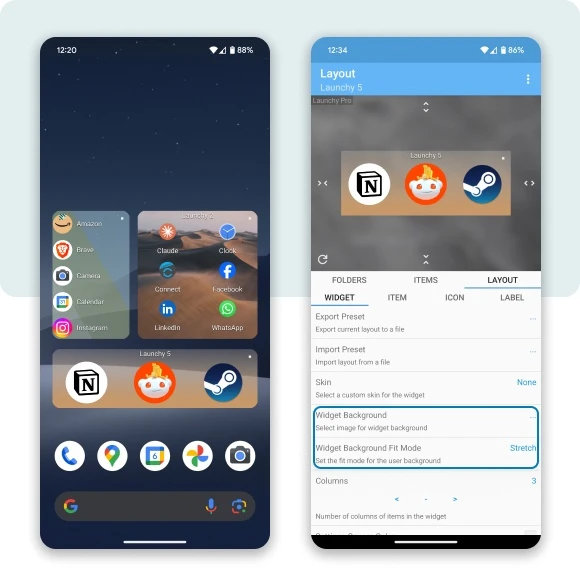
It is now possible to use any image as a background for your Launchy Widgets! Use your favorite photo or an abstract image as widget background to create beautifully looking home screen. You can use an empty Launchy Widget with a background as a photo frame on your home screen.
It is also possible to use transparent PNG files as widget background. This opens up a whole new level of creativity as you are now able to design your own widget skins by creating and applying a custom created PNG files.
Tip: Use a PNG file with transparent background for beautiful effects
Tip: Use an empty Launchy Widget with background as a photo frame
To select a background image for your widget:
- Add a widget to your home screen
- Tap the settings square to open widget configuration
- Navigate to Layout › Widget
- Tap "Background Image"
- Tap "Browse" to open media picker and select an image
- Select the desired portion of the image
- Tap "Set"
Control background fit options with the Fit Mode configuration.
Layout › Widget › Background Fit Mode
Also in this Release
- Library Updates
Version 4.7.0, 17.09.2024
Items Screen Redesign
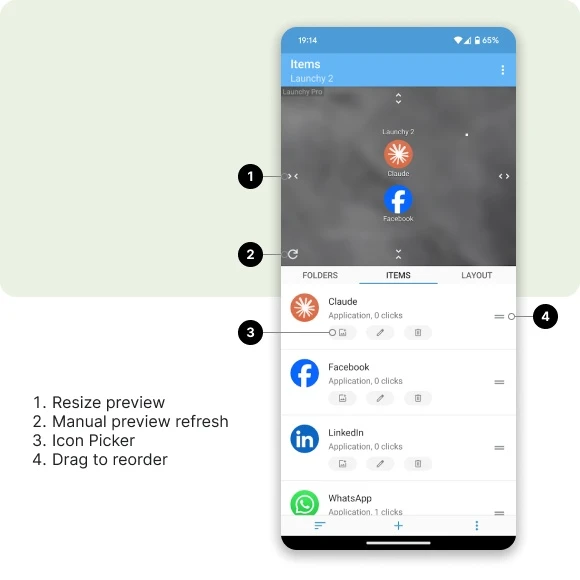
It is now even easier to customize the looks of your mobile screen with Launchy Widget. The "Items" screen has been redesigned to allow easy and intuitive item management ability. There are now dedicated buttons on each of the items for most basic operations: modify item icon, edit item title, and delete the item.
Launchy Icon Picker
The Launchy Icon Picker provides access to all image and icon providers on your mobile device. You can select any image from any existing icon pack image or photo to act as item icon.
For example, it is possible to add a direct dial to a Launchy Widget and then select a recent photo of the contact from the photo gallery to act as the contact image.
- Tap the settings square to open widget configuration
- Navigate to the "Items" screen
- Tap the "Launchy Icon Picker" icon (first icon from the left)
- Use any of the available options to select any image or icon for your item
Version 4.6.4, 20.07.2024
This is a maintenance release of Launchy Widget, no changes in user facing functionality.
- Library updates and minor bug fixes.
Version 4.6.3, 21.06.2024
Get Creative
Get creative with Launchy Widget Pro! It is now again possible to upgrade to Launchy Widget Pro from within the settings screen. By upgrading you unlock additional unique features and support Launchy Development.
- New: Add ability to upgrade to Launchy Widget Pro.
- Fix: Use Launchy Instagram Page links instead of Google Plus community.
Version 4.6.2, 04.06.2024
Bugfixes
This release addresses issues which were reported by users. Big thanks for those who have taken the time to report regression issues in the latest releases. In case of unexpected behavior feel free to contact me directly at [email protected]
- Fix: Fixed a critical issue where Pro users would not see the Pro options.
Version 4.6.1, 01.06.2024
Export and Import
Enable Export and Import Preset functionality for Pro users. New import and export functionality uses proper way to save and read user selected files and does not require storage permissions. Also the new preset import functionality does not require settings application restart. For now the Built-in preset functionality is still not enabled, but will be enabled in future versions.
- New: Manual refresh button in the Widget settings preview area.
- Improvement: Use intuitive icons instead of the +H, -H, +W, -W buttons in the preview area.
- Improvement: Enable Export Preset and Import Preset functionality.
- Improvement: Update application dependencies as requested by Google Play Store.
- Fix: Deprecate ability to set user background in preview area.
Version 4.6.0, 13.05.2024
Blast from the Past
Launchy Widget is back! This is first maintenance release which addresses changes in Android ecosystem. Additional maintenance and improvements releases are planned for the upcoming future. In case of unexpected behavior feel free to contact me directly at [email protected]
- New: Use different color picker to select various colors.
- Improvement: Target the newest Android SDK.
- Improvement: Update dependencies to newest packages.
Version 4.5.1, 08.06.2018
Increased the number of available folders from 15 to 30.
This means that it is now possible to have up to 30 separate Launchy Widgets with a different set of items in each one.
Version 4.5.0, 21.04.2018
Add three new fonts for Launchy Widget Pro users.
Bug fixes, improvements and library updates.
Version 4.4.1, 30.12.2017
Legacy code removal and bug fixes.
Version 4.4.0, 22.12.2017
- New: Redesigned configuration screen with preview always visible
- New: Redesigned and more consistent configuration controls, new color picker
- Improvement: The preview size buttons are now placed on the preview itself
- Change: The icon theme configuration has been moved from the Icon Layout tab to the Items tab.
To apply an icon theme go to Items › Three dots at the bottom › Icon Pack - Bug fixes
Version 4.3.2, 25.11.2017
- Fix: Widget not responding issue on Android 8
- Additional tweaks based on user input
Version 4.3.1, 24.11.2017
This is bug fix release to address some of the issues introduced in the previous release.
- Fix: Storage permissions bug introduced in the previous release
- Fix: User background not visible in layout preview when using stretch or center modes
- Fix: App crash when using user background and starting the main launcher Launchy Widget info app
Version 4.3.0, 22.11.2017
This is a first in a series of updates intended to improve Launchy Widget and to make it more user friendly and intuitive to use.
- Improvement: The "Assign" tab has been rewritten from scratch and renamed to "Folders". In this screen you select which folder will be used for the current widget.
- Improvement: The "Items" tab has been redesigned and rewritten from scratch. This screen allows to manage the items in the current folder.
- New: Added option to sort the items by name or click count, in ascending or descending order: Items tab › sort option at the bottom.
- New: Added option to delete all items in a folder: Items tab › three dots at the bottom › Delete all items.
- New: Share bookmark to Launchy: It is now possible to share bookmarks from an internet browser directly to Launchy: in the browser click share page › select Launchy.
- Change: It is no longer possible to automatically import bookmarks from browsers due to Android security restrictions. As an alternative, it is possible to add bookmarks manually or to share bookmarks from browsers to Launchy.
- Fix: For newer versions of Android the preview screen, icon picker and the skin selection dialogs did not display the user wallpaper correctly, this has been fixed.
- Improvement: Added memory cache for displaying items in the widget, this should make scrolling long Launchy widgets smoother.
- Many other fixes and improvements.
Version 4.2.1, 12.10.2017
Library updates and minor bug fixes.
Version 4.2.0, 19.08.2017
- New: Set Launchy background from any png or jpg image file. Launchy will scan the sdcard / LaunchyWidgetAssets / backgrounds folder for any images. Place your images there.
- Bug fixes.
Version 4.1.0, 16.04.2017
- Redesigned the UI of the main application.
- Fix: Various permission requests for Android Marshmallow and higher.
- Fix: Rare issue where the preset was not exported correctly.
Version 4.0.0, 08.04.2016
A major upgrade for Launchy Pro users: added an option to export and import presets.
Version 3.7.1, 26.03.2016
- Increased the number of Launchy widgets to 15.
- Under the hood: Preparations for new upcoming option to export and import layout presets. Some of your settings might be reset to default values.
Version 3.7.0, 10.11.2015
- Added option to add bookmarks manually in case Launchy cannot import bookmarks from the browser. To add a bookmark manually: Add Item › Bookmark Manually.
- Redesigned the add new item menu.
Version 3.6.0, 26.06.2015
- Drag to sort items in the items screen
Version 3.5.0, 19.06.2015
- New experimental widget display engine: smoother and improved scrolling of Launchy widgets.
- New Launchy Icon.
Version 3.4.2, 13.01.2015
- Added six new fonts to the font selection for the labels and the widget title.
Version 3.4.1, 03.01.2015
- Added an option to control widget title alignment. Settings › Layout › Widget › Title Alignment.
- Added an option to access the settings screen by tapping the title, when the title is visible. Tip: when the title is visible, make the settings square transparent for a cleaner look.
Version 3.4.0, 01.01.2015
- Added an option to display a widget title on top of each Launchy. Settings › Layout › Widget › Title Visibility. The default setting is to show widget title.
- To give a different name to a widget go to Settings › Assign › Rename.
- Added options to control the widget title font size and color. Settings › Layout › Widget › Font, Size, Color.
Version 3.3.3, 20.08.2014
- Added the red neon underline widget and item skins.
- Added a new font.
Version 3.3.2, 18.08.2014
- Added two more item and widget skins.
- An attempt to fix a bug that caused crash when switching between the main 3 tabs in the settings screen.
Version 3.3.1, 15.08.2014
- Improved items skins placement, added more item skins.
- From now the live preview in the layout tab will only show the top two rows of items. This is done to faster render the live preview and save resources.
- Improvements and optimization.
Version 3.3.0 Beta, 12.08.2014
- Introducing item skins: it is now possible to apply a skin around each item in the widget.
- Added label hue, brightness, and RGB controls.
Version 3.2.3, 06.08.2014
- Fixed a bug that sometimes caused a crash of the settings layout screen.
- Added metro red skin.
Version 3.2.2, 05.08.2014
- This version includes new options added in the previously released beta versions.
- Added an option to manually control the placement of the label relative to icon.
- Added an option to control the shadow size, x offset, y offset and color.
- Added an option to add a stroke of any color around the labels.
- Added an option to add glow of desired color, size and blur radius for icons.
- Changed some of the sliders to buttons in the settings screen for more precise control.
- Added four new fonts, removed some of the old fonts that were not behaving as expected.
Version 3.0.4, 27.07.2014
- Added metro green and yellow skins.
- Removed the ads from Launchy for better user experience.
Version 3.0.3 Beta, 26.07.2014
- Added two more skins: Sunken and Metro Style. The Metro Style skin will be the default skin for newly added widgets.
- Added a short tutorial in the main app screen which is accessible via the app drawer.
Version 3.0.2 Beta, 22.07.2014
New Settings Screen
A complete redesign of the widget settings screen. A Layout tab has been added instead of the Configure tab. The Edit tab has been renamed to Items. Now the new Layout screen features a full live preview of the changes made to the widget.
- Made changes to Fonts and Skins data models, your fonts and skin might reset to default after this update.
- Add an option to control the icon saturation. Make the icons black and white or color enhanced.
- Add more fonts and skins. All skins are pixel perfect and fully scalable.
- Add an option to set a custom color for the settings square dot in the top right corner: Layout › Widget › Settings Square Color.
- Made the settings square area a little bigger, this will make it easier to hit the settings square area when the square is invisible.
- It is possible to make the settings square transparent to achieve a cleaner look.
- The option to hide the settings square is now removed, to hide the settings square, just make its color transparent.
- Add an option to control the label transparency: Layout › Label › Label Color › Adjust the transparency with the slider.
- The settings screen will now remember the last used tab. When opening the settings again, it will open on the last used tab.
Version 2.6.1, 28.06.2014
- Add a new Kinux skin by dbconcept.
- Fixed a bug that caused a crash when using empty Launchy with infinite scroll on.
Version 2.6.0, 27.06.2014
Settings Square
Changed the way the settings screen is accessed. The green Edit icon has been removed, instead the settings screen can be accessed by clicking the settings square dot in the top right corner of the Launchy.
- Add an option to hide the settings square dot in the top right corner: Configure › Settings Square Hide. The dot becomes invisible but you can still access the settings screen by tapping the top right corner.
- Changed the way icons size is recognized. This should fix the small icons at 100% issue on Nexus 7 and other devices.
- A potential fix for a crash when starting the upgrade to pro dialog.
Version 2.5.1, 17.06.2014
- New Stock Red Glow Skin by Darryl Dillon.
- Increase Icon size option up to 250%.
- Increase Label size option up to 40pt.
- Increase Label length option up to 40 Letters.
Version 2.5.0, 31.05.2014
- Create a skin selector with a preview of the skins. Configure › Skin.
- Add new option to control icons transparency. Configure › Icon Transparency.
- Add new Opak skin by dbconcept.
- Add new Stock Glow skin by Darryl Dillon.
- Add 4 new fonts.
- Bug fixes and stability improvements.
Version 2.4.0, 25.05.2014
- Add search option when adding items.
- Increase maximum number of columns to 7.
- Increase vertical spacing selection up to 50dp.
- Add new Mattx skin by dbconcept.
- Add new Red Glow skin by RS.
Version 2.3.0, 17.05.2014
- Add 2 new skins by dbconcept: Black and Pressed.
- Add additional new Cyan Glow skin by RS.
- All skins updated to crisp hi-res graphics to support multiple screen sizes.
Version 2.2.0, 08.05.2014
- Add an option to apply an Icon Theme to all icons in a Launchy with one click! Launchy Edit screen › Configure › Icon Theme.
- When applying an Icon Theme dont forget to remove the green Edit icon for a nice clean look: Launchy Edit screen › Configure › Double Tap To Edit. Double tap any item inside a Launchy to start the Launchy Edit screen when the Edit icon is removed.
- Add an option to delete all items from a Launchy. Launchy Edit screen › Menu › Delete All Items.
- Separated the settings in Launchy Configure screen to categories.
- A potential fix to a rare bug that was causing the application to crash.
Version 2.1.1, 02.05.2014
- Add an option to adjust the Double Tap interval between 350 and 650 milliseconds. Use Double Tap to remove the Edit icon, and access Launchy Edit screen by double tapping any item inside the Launchy widget.
- Changed widget minimum resize width and height to 1x1. This means that the widget can be resized to any size in all launchers.
- Add new Dark Glass skin.
Version 2.1.0, 28.04.2014
- Add an option to remove the Edit Icon from all non empty Launchy widgets. Double tap any item inside Launchy widget to start the Launchy Edit screen.
- Add an option to display multiple columns of items inside each Launchy.
- Add an option to set vertical spacing of items in Launchy for Android 4.1 and above. Users Android below 4.1 will not see this option in the settings.
- Rearranged the order of settings in Launchy Configure screen.
Version 2.0.1, 22.04.2014
- Add icon search functionality in the icon picker when selecting from an icon pack. Type in icon name to filter.
Version 2.0.0, 20.04.2014
Icon Packs Support!
It is now possible to use external icon packs to customize icons inside Launchy Widget.
To set a custom icon for an item: Install an icon pack › Launchy Edit screen › Item edit › Tap the icon › Icon packs.
- Stability improvements.
Version 1.3.1, 05.04.2014
- Stability improvements and bug fixes, preparations for icon packs support.
Version 1.3.0, 03.04.2014
Custom Icons
It is now possible to change icons of the items in the Launchy! Select new icon from gallery or from icons of apps installed on the device.
To change an icon, click edit item and tap the icon. Icon packs support coming in the future.
- A potential fix for a certain error that was causing edit screen crash.
Version 1.2.1, 22.03.2014
- Fixed an issue where some apps could not be add and were resulting in a corrupted Launchy.
- Add an option to reset and recover a corrupted Launchy. Big thanks to Francois for reporting and assisting.
- Set Glass skin as default for newly add Launchy widgets.
Version 1.2.0, 22.03.2014
- Infinite scroll! Add an option to enable an endless loop of items for each Launchy individually. The option is located in the Configure screen.
- New Glass skin. Select it from the skins list in the Configure screen.
- A small banner ad add to the bottom of the Edit screen. Pro Launchy unlocks all Launchy features and also remove the ad.
- Bug fixes and stability improvements.
Version 1.1.4, 16.03.2014
- Shortcuts for everyone! Adding shortcuts is now also available in the free Launchy version
- Bug fixes
Version 1.1.3, 06.03.2014
- Add an option in the Configure screen to select where to look when adding bookmarks. Now it is possible to look only in bookmarks or in bookmarks and browser history.
- A potential fix to an issue where new bookmarks were not found by Launchy when adding.
Version 1.1.2, 05.03.2014
- Increased the number of unique Launchy widgets from 7 to 10
- Small bug fixes
Version 1.1.1, 15.01.2014
- Add an option to select label color
Version 1.1.0, 10.01.2014
- Add an option to display the label on the right, left or under the icon
- Improvements and bug fixes
- Slight changes in the Launchy icon
Version 1.0.3, 01.01.2014
- Improved long list Launchy scrolling when only the label is displayed
- Add an option to control the allowed label length when only the label is displayed
- Add two additional fonts
Version 1.0.2, 31.12.2013
- Improved scrolling of Launchy Widgets with long lists
- Add Launchy launcher application that displays instructions for users on how to add the Launchy Widget to the home screen
- Small bug fixes
Version 1.0.1, 28.12.2013
Add option to select the location of the Edit Icon.
Now it is possible to show it as the top item or as the bottom item.
Version 1.0.0, 17.12.2013
Initial public release of Launchy Widget.